Interface map
Every panel, rail, HUD, dock and modal in Dayside, what each is for, where its controls are documented, and one complete shortcut table.
A lookup for the interface. Each entry says what the surface is for and points at the page that documents its controls in depth. The shortcut table at the end is the complete set.
Three screens#
Dayside has one window and three screens. The project decides which one you land on.
| Screen | When you see it | What it is for |
|---|---|---|
| Worlds picker | On launch, and via the back button | Opening, searching, sorting and deleting projects. |
| Globe workspace | Opening a project whose workflow is a whole world | Cutting regions off the sphere and folding finished work back in. |
| Section editor | Opening a flat map, or opening a region from the globe | Painting, generating, rendering and exporting one section. |
The setup wizard is a route (#/setup) rather than a screen: it layers over whatever is behind it and makes the app behind it inert.
Worlds picker#
The front door. Documented in Your first world.
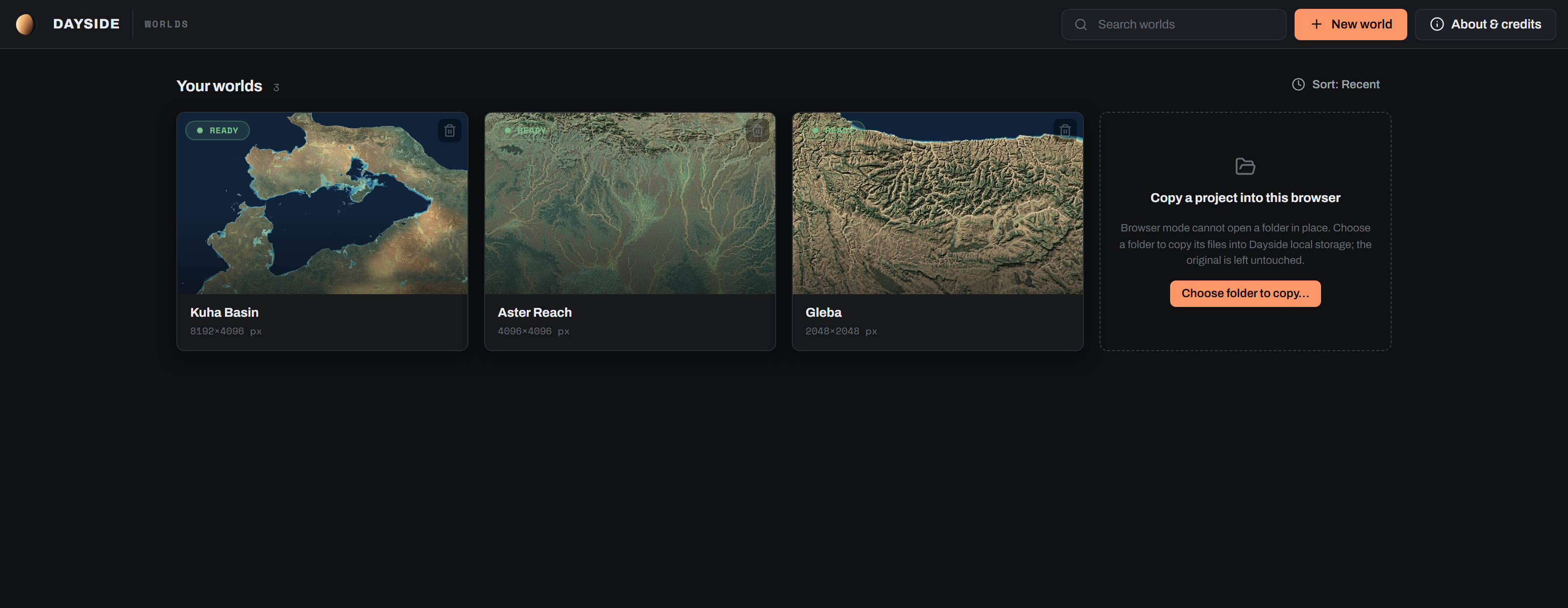
| Element | What it is for |
|---|---|
| Search field | Case-insensitive substring match on the world name. |
| New world | Opens the setup wizard. See Setting up a world. |
| About & credits | Version, licences, bundled data credits, diagnostics and data removal. |
| Sort | Cycles Sort: Recent, Sort: Name, Sort: Size. Recent uses local recency, Size uses pixel area descending. |
| World card | Thumbnail, status badge (QUEUED, ACQUIRING · N%, READY, NOT READY), name, last opened, pixel size, and a delete button. |
| "Open a project" card | Opens an existing project folder in place, through the Windows folder picker. Dayside works in that folder and makes no private copy. |
| Workspace takeover | Replaces the whole grid when there are no cards. Two variants: ENGINE OFFLINE with a Retry connection button, and NO WORLDS YET with Import a world and New world. While offline the picker retries every 5 s. |
Globe workspace#
The whole-world screen. Documented in Working on a globe.
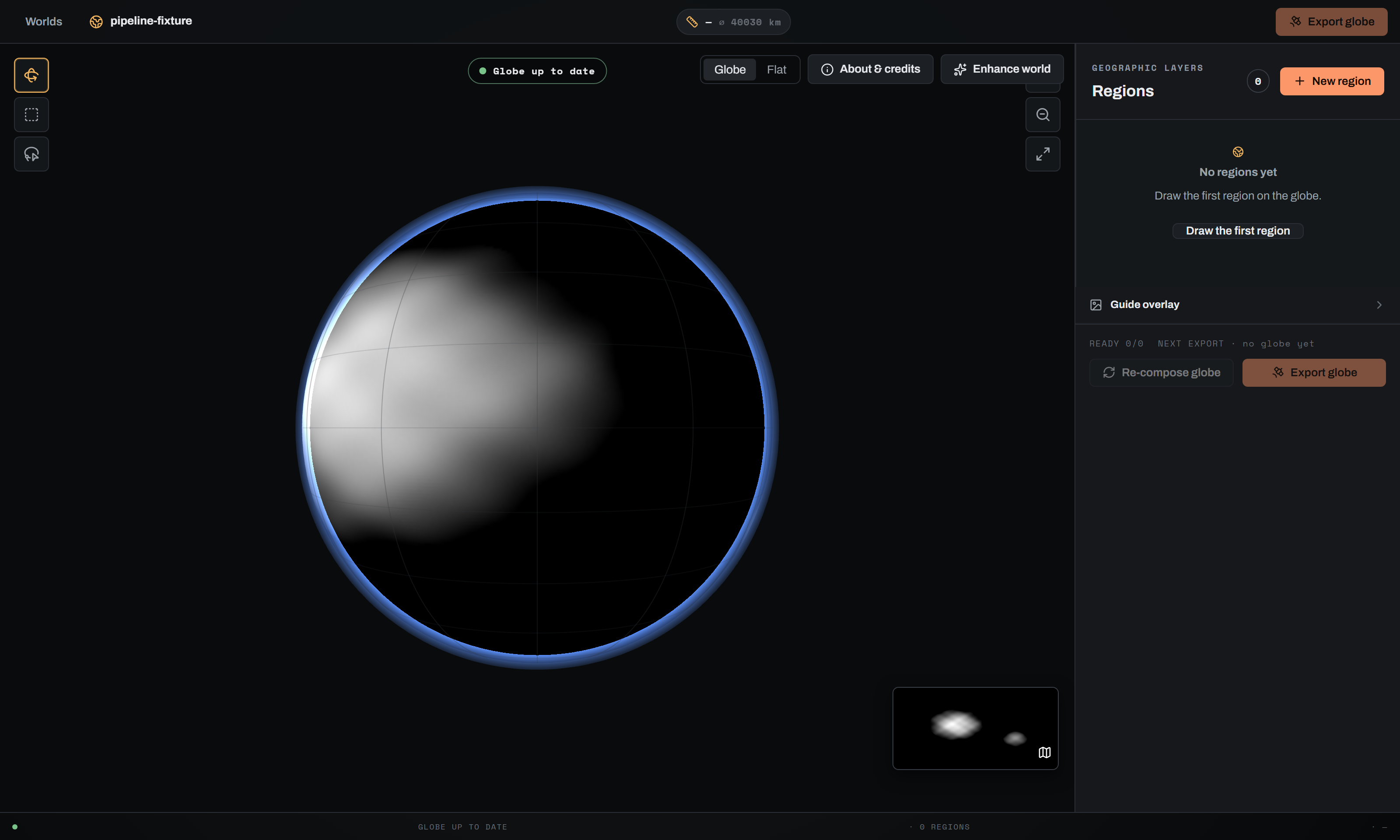
Top bar#
| Element | What it is for |
|---|---|
| Worlds | Back to the picker. |
| World crumb | Globe icon and the world name. |
| Jobs rollup | Appears only when something is running or has failed, for example 1 RUNNING · 1 FAILED. Clicking scrolls the job dock into view. |
| Scale chip | Ground resolution and circumference. Prefixed with a tilde until the server publishes a scale. Opens the scale explainer. |
| Export globe | Opens the globe export modal. Disabled until an active mosaic exists. |
Stage and tools#
Globe tools is a three-way exclusive toolbar: Rotate orbits the sphere, Box drags a longitude and latitude box, Lasso draws a freehand polygon. The Globe and Flat toggle sits in the actions row beside About & credits and Enhance world.
The stage itself takes focus and handles G, F and Escape. The globe canvas and the flat surface each have their own key set; both are in the shortcut table.
Canvas overlays#
| Element | What it is for |
|---|---|
| Status chip | Globe up to date, Globe out of date, or Updating globe… |
| Stale banner | Names what changed and offers Re-compose globe. |
| Terminator | A daylight edge bound to progress while a world pass runs. The lit region is the rendered region. |
| Scale bar | Ground distance across a pixel span, rounded to 1, 2 or 5 times a power of ten. |
| Zoom controls | Zoom in, Zoom out, Reset view. |
| Flat inset | Opens the flat world view. |
| Compare toggle | Show original against Showing original. |
Side panel#
| Group | What it is for |
|---|---|
| Regions | The focus-area list, each card showing status, size, a four-dot pipeline glance and a delete button. New region starts a draw. The size quoted is the selection you drew, before the feather is added. |
| Globe tiles | The machine-planned tile grid, with an On globe checkbox for the ring overlay and an edited-tile count. Hidden when there are no tiles. |
| Guide overlay | The same control the section editor mounts. One guide selection is shared between the sphere and the paint stage. See Painting terrain. |
The pipeline glance on a region card is always in this order: Rough terrain, Terrain detail, Analytic colour, Learned enhance.
Job dock#
Bottom left, one card per long-running globe job: Rebuild globe, Re-compose globe, Colour globe, Enhance world terrain, Create region. Cards persist through Queued, Running, Done and Failed, so a modal you closed can never read as success.
A running card shows stage and percent, a failed card shows the reason plus a Try this: fix, and a finished card shows its duration. Cards offer Cancel, a retry (Retry, or Refresh for a region creation) and a dismiss. Every card carries a scope and subject tag so a button and its job card always agree.
Footers#
The panel footer states READY n/N and the next export size, and holds Re-compose globe (enabled only when the globe is stale) and Export globe. The globe footer is one mono line: status, region count and scale.
Section editor#
Top bar#
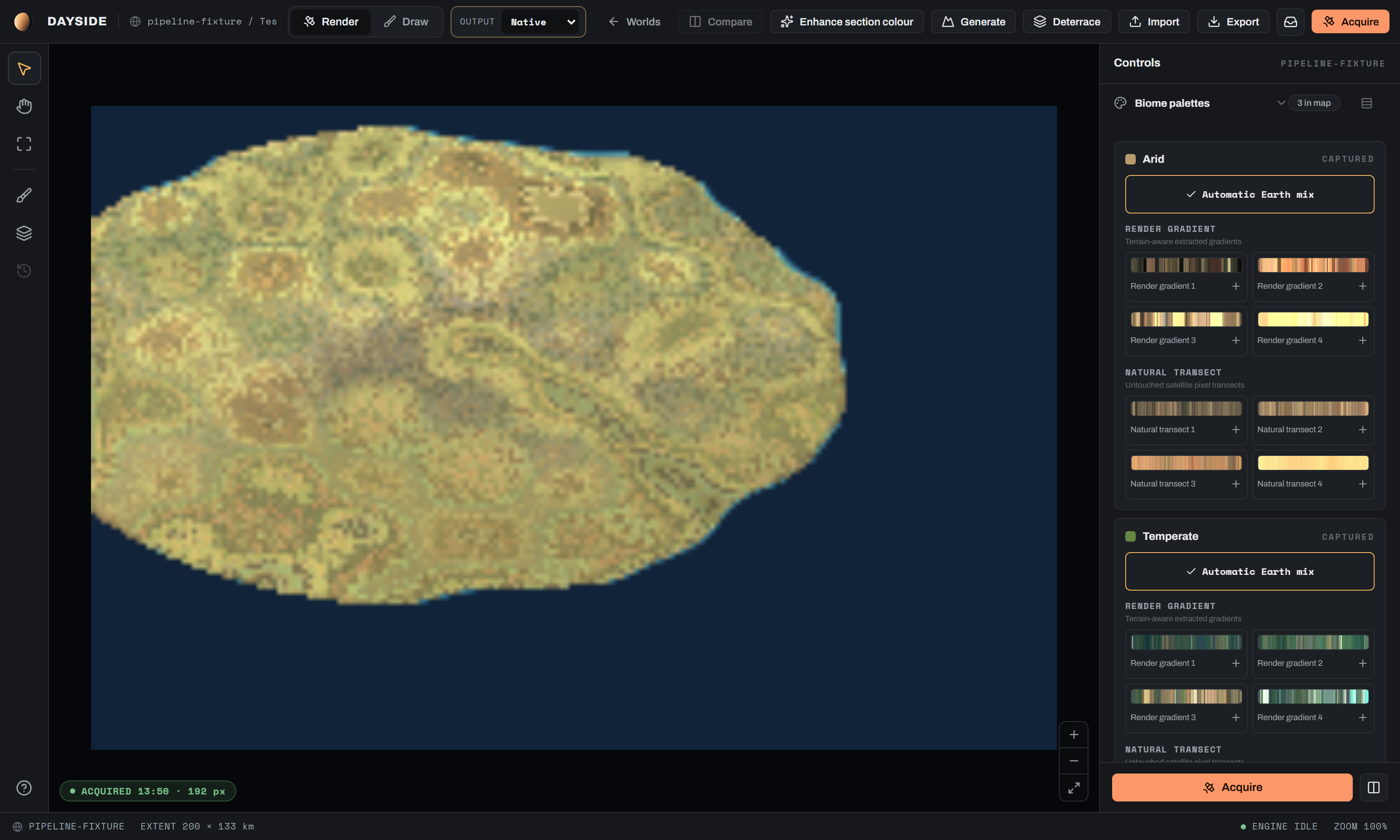
| Element | What it is for | Documented in |
|---|---|---|
| Render / Draw | The mode switch. Draw is the paint surface, Render is the frame and its controls. | Painting terrain |
| Output | Final heightmap and colour export resolution: Native, 2K, 4K, 8K, 16K, 32K. Remembered per world and section. | Exporting |
| World / Worlds | Back to the globe workspace, or to the picker on a flat project. | |
| Compare | A and B wipe between the previous frame and the current one. | Rendering the satellite image |
| Enhance section colour | The learned luminance-detail pass over the analytic colour. | Rendering the satellite image |
| Generate | Re-synthesizes the heightmap through the terrain model. | Enhancing terrain, Terrain and generation reference |
| Deterrace | Melts a contour map's risers into ramps inside their authored bands. | Terrain and generation reference |
| Import | Brings a heightmap back from Gaea, Wilbur or World Machine. | Exporting |
| Export | Opens the export modal, which queues a full-resolution acquisition. | Exporting |
| Acquisitions | Opens the acquisitions drawer. Pulses while an export is in flight. | Exporting |
| Acquire | Starts a colour render. | Rendering the satellite image |
Most of these disable each other: nothing in the row is available while a render, a generate, an enhance or a paint commit is in flight.
Left rail#
Fifty-six pixels wide, top to bottom.
| Button | What it does |
|---|---|
| Inspect | Pointer tool. |
| Pan (drag canvas) | Hand tool. Space is the temporary override from anywhere. |
| Fit | Fits the frame to the viewport. |
| Height brush (Draw mode) | Switches to Draw mode on the height layer. |
| Biome layer | Switches to Draw mode on the biome layer. |
| Paint history | Toggles the history panel. Disabled outside Draw mode, where its tooltip says as much. |
| About & credits | Pinned to the bottom. |
Every rail button except About & credits is disabled while a paint commit is running.
Canvas#
Pan by dragging, zoom from 0.6 to 3.0 in steps of 0.25, and a Zoom in / Zoom out / Fit cluster bottom right. The compare divider is clamped between 4 % and 96 %.
The canvas states the render's phase on itself rather than in a panel: ACQUIRING · N% with a pass and resolution readout, QUEUED with a queue position and Prioritise / Cancel, PREVIEW STALE · N CHANGED with Re-render, a failed pass with a retry, NO ACQUISITION YET, or an ACQUIRED chip. In Draw mode it instead reports LOADING HEIGHTFIELD…, CANNOT PAINT, or the coastline preview's state.
Heads-up display#
Mounted only in Draw mode with the Draw tool. There is no equivalent readout in Render mode.
| Readout | What it shows |
|---|---|
| Height under cursor | The signed elevation under the pointer, a range bar, and the section's minimum and maximum. Height layer only. |
| Brush / Stamp / Landmass | The live cursor label: ground diameter and mode for the brush, ground span and heading for a placement, plus mirror, jitter and land or remove flags. |
Controls behind these readouts are in Painting terrain and Terrain and generation reference.
Control panel#
Three hundred and forty-four pixels wide, on the right, headed Controls. Acquire and Compare A/B are pinned to its foot in both modes.
In Draw mode it holds the paint stack:
| Group | Documented in |
|---|---|
| Paint history, Apply changes, the Height / Biome layer switch | Painting terrain |
| Height brush: sea level, brush mode tiles, size, strength, falloff, the set-height modes and the level palette | Terrain and generation reference |
| Landform, Landmass, Refine a region bands | Terrain and generation reference |
| Biome brush and the Köppen picker | Painting terrain |
| Guide overlay | Painting terrain |
In Render mode it holds the look stack, all of it documented in Colour and climate reference:
| Group | Default state | What it covers |
|---|---|---|
| Biome palettes | open | Per-biome gradient preference lists, or Automatic Earth mix. |
| Biome blending | open | Transition width, flow widening, wet bias, patchiness, patch size. |
| Rivers | open | The rivers switch, density and width, plus the Lakes and Water colour sub-groups. |
| Sea | collapsed | Shallow tinting, deep cutoff, deep colour, coast blend, and an Advanced block of per-biome tints and seabed visibility. |
| Snow & ice | collapsed | Snow line, coverage, warmth, and snow shedding under Advanced. |
| Global look | collapsed | Relief, relief shading, texture detail, seed. |
Every slider commits on release, and every commit marks the preview stale. Groups whose inputs are inert say so: the flow widening, green banks, river strength and every lake control grey out when Rivers is off.
Footer bar#
One mono strip: world name, EXTENT w x h km, an engine pill and the zoom level. The engine pill reads QUEUED · POSITION n, ACQUIRING N%, PREVIEW STALE, PASS FAILED or ENGINE IDLE. The extent quoted is your own selection, before the raster padding.
Global chrome#
Status strip#
Mounted above every screen, so a warning is never editor-only. Three rows, worst first:
- Engine offline, with a message, a fix and a dismiss. Suppressed on the picker when the workspace takeover already owns that state.
- Notice, one line per engine or API warning, each dismissible.
- Reconnecting to the engine…, shown only after the socket has been down for more than one retry cycle, with a world open, and no offline row showing.
Edit-proxy banner#
Sits under the top bar when a section is being edited through a working-resolution proxy. It states the working resolution, the native size and the count of edits not yet baked, and offers Bake to native and Discard. On resume it instead offers Edit at 4K and Change…
The bake is always an explicit button. It never fires on its own. See Enhancing terrain.
Modals#
| Modal | Opened by | What it is for | Documented in |
|---|---|---|---|
| Setup wizard | New world, or the #/setup route | Creating a world: shape, map, sea and terrain, build. | Setting up a world |
| World loading | Clicking a world card | Hydrating a project, with a caption sequence and a Cancel. | Your first world |
| World type fork | A card whose workflow was inferred and is world-eligible | Choosing a flat map or a whole world once, before the editor opens. | Setting up a world |
| Remove / erase world | The card's delete icon | Two stages: remove from the list, then permanently delete files. Only app-managed worlds reach stage two. | Your first world |
| Failed open | A world that errored on open | The message, a fix and a Retry. | |
| Export, new acquisition | Top-bar Export | Destination, layer set, output folder, and a queued full-resolution export. | Exporting |
| Generate terrain | Top-bar Generate | Model, precision, output resolution, SNR, seed, rainfall and coastline options. | Enhancing terrain, Terrain and generation reference |
| Deterrace | Top-bar Deterrace | Detected elevation levels (one number each), the section's max height, radius and iterations. | Terrain and generation reference |
| Import processed heightmap | Top-bar Import | Round-tripping a file from Gaea, Wilbur or World Machine back onto the section. | Exporting |
| Enhance section colour | Top-bar Enhance section colour | The learned luminance pass, its detail strength, and the base-model download. | Rendering the satellite image |
| Edit at a working resolution? | Opening a large section, or the banner's Change… | Picking a proxy resolution. The choice is remembered per section, so it never asks twice. | Enhancing terrain |
| Enhance world | Globe workspace Enhance world | The whole-world terrain pass and the globe colour pass, which can be chained. | Working on a globe |
| Export globe | Export globe, in the top bar or the panel footer | Source, resolution, layers, destination and output folder for the whole globe. | Exporting |
| Region drawer | Clicking a region card or a globe tile | The four-stage pipeline, the next step, and Open in editor. | Working on a globe |
| Region composer | Completing a box or lasso selection | Naming the region and, under Advanced controls, its output long side and overlap policy. | Terrain and generation reference |
| Delete region / Cancel creation | The region delete icon, or cancelling a run past 90 % | Confirmation. The cancel confirmation only appears near publication. | Working on a globe |
| Scale explainer | The top-bar scale chip | Circumference, planet radius, ground resolution and model cell. | Working on a globe |
| About & credits | Any About & credits or help button | Versions, licences, bundled data provenance, the diagnostics bundle and data removal. | Install and first launch |
| Restart setup | The wizard's Restart setup | Confirming that the draft is discarded. | Setting up a world |
The acquisitions drawer is not a modal. It slides in from the top-bar inbox button, is mounted in both the editor and the globe workspace, and lists every export with its status, its files and its Gaea handoff numbers.
WorldRebuildPanel is implemented and shipped but is not mounted by the current globe workspace, so no navigation reaches it. Its Rebuild globe job still appears in the job dock. Confirm whether it should be listed here as a reachable surface or removed from the build.Words the interface uses consistently#
Action verbs are fixed. Acquire and Re-render start a section render; Render section colour produces the analytic base; Enhance section colour is the per-section learned pass; Generate terrain is section diffusion; Enhance world terrain and Colour globe are the two whole-world passes; Re-compose globe and Update globe fold edits back in; Bake to native replays proxy edits onto the master.
Every action header and job card also carries a scope and subject tag, formatted WHOLE WORLD · TERRAIN or SECTION · AI, so you can always tell what a running job will touch.
Keyboard shortcuts#
Every shortcut in the app. All of the Draw-mode keys are suppressed when focus is in a text field, a text area, a select or a contenteditable element.
| Key | Context | Action |
|---|---|---|
| Space (hold) | Draw mode | Temporary pan override. The cursor becomes a grab hand and the brush ring hides. Yields to a focused button, link, checkbox, switch, tab, radio, menu item or option when the pointer is off the canvas. Released on key up, or when the window loses focus or is hidden. |
[ / ] | Draw mode, height layer, a stamp or landmass selected | Shrink or grow the placement. |
| Left / Right arrow | Draw mode, height layer, a stamp or landmass selected | Rotate the placement 1 degree. |
| Shift + Left / Right arrow | Draw mode, height layer, a stamp or landmass selected | Rotate the placement 15 degrees. |
[ / ] | Draw mode, height layer, any absolute height mode | Step the target height down or up through the saved level palette. Does nothing in Relative mode. |
| Ctrl/Cmd + Z | Draw mode | Undo the last stroke. |
| Ctrl/Cmd + Shift + Z | Draw mode | Redo. |
| Alt + click | Section canvas, height layer | Eyedropper: sample the height under the cursor into Target height, snapped to levels when Snap to levels is on. |
| Ctrl/Cmd + scroll | Section canvas, a placement picker open | Step to the next or previous landform or coastline shape. Falls through to zoom everywhere else, so trackpad pinch still zooms. |
G | Globe stage focused | Globe view. |
F | Globe stage focused | Flat view. |
| Escape | Globe stage | Clear the draft selection and return to the Rotate tool. |
| Arrow keys | Globe canvas | Rotate 5 degrees. |
| Shift + arrow keys | Globe canvas | Rotate 15 degrees. |
+ or = | Globe canvas | Zoom in by 0.10, up to 2.0. |
- | Globe canvas | Zoom out by 0.10, down to 0.65. |
0 | Globe canvas | Reset yaw, pitch and zoom. |
| Arrow keys | Flat view, Rotate tool | Pan 12 px. |
| Arrow keys | Flat view, a selection tool | Move the cursor 1 degree. |
| Shift + arrow keys | Flat view, a selection tool | Move the cursor 5 degrees. |
| Space | Flat view, a selection tool | Anchor the first corner. Announces "First corner anchored". |
| Enter | Flat view, a selection tool with an anchor | Complete the selection. |
| Escape | Flat view, a selection tool | Cancel the selection. |
+ or = | Flat view | Zoom in by 0.25, up to 4.0. |
- | Flat view | Zoom out by 0.25, down to 0.75. |
0 | Flat view | Reset zoom and pan. |
| Escape | Region composer | Cancel the selection and return to the Rotate tool. |
| Escape | Setup wizard | Closes the restart dialog if it is open, otherwise leaves the wizard route without destroying the draft. |
| Escape | About & credits | Close. |
| Escape | Enhance section colour | Close, but only while nothing is running. |
| Escape | World rebuild panel | Close. |
| Tab | Setup wizard, About & credits, Enhance section colour | Trapped inside the dialog. |
The export, generate, deterrace and import modals have no Escape handler. Close them with their own close button. Deterrace additionally refuses both the close button and a backdrop click while a run is in flight.